Goal Setting Conferences
Goal Setting Conferences
Please see below the instructions on how to download a copy of the template for your goal setting conferences.
Please make sure you read and follow these instructions to get your own copy.
How to Copy and Share the Google Slides Goal Setting Template:
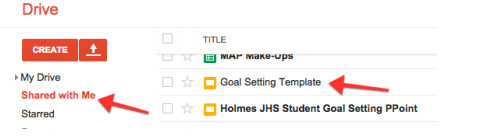
1. Locate the Goal Setting Template sent from your Administrator in Google Drive > “Shared with Me.” Click on the file to open.
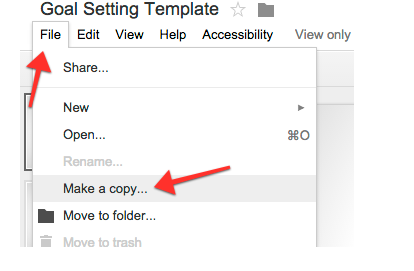
2. Make a copy of the file.
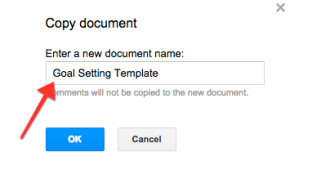
3. You can leave the name as is, or customize for your class.
4. Share the file with your students.
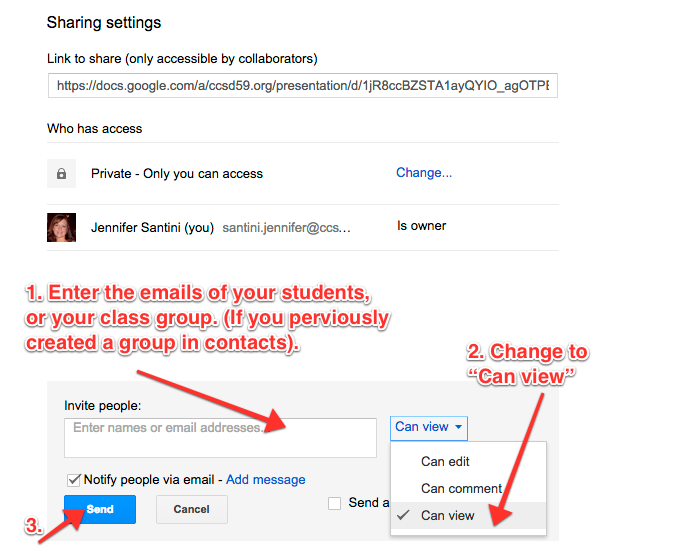
5. Students repeat steps 1-3 to find the shared file from their teacher and make a copy. They can edit the new copy and it will automatically save in their Google Drive.
Once you have read these instructions please click on the link below to download your copy.
Please see below the instructions on how to download a copy of the template for your goal setting conferences.
Please make sure you read and follow these instructions to get your own copy.
How to Copy and Share the Google Slides Goal Setting Template:
1. Locate the Goal Setting Template sent from your Administrator in Google Drive > “Shared with Me.” Click on the file to open.
2. Make a copy of the file.
3. You can leave the name as is, or customize for your class.
4. Share the file with your students.
5. Students repeat steps 1-3 to find the shared file from their teacher and make a copy. They can edit the new copy and it will automatically save in their Google Drive.
Once you have read these instructions please click on the link below to download your copy.